 Skip to content
Action Apps
Actions allow apps to expose an autogenerated UI for simple backend actions. For use cases where an existing CLI application or API needs to be exposed as a web app, actions provide an easy solution. An app can have one or more actions defined. Each action has to be given a unique path, which does not conflict with any other route defined for the app. See weather app code:demo for an example of using Actions.
Sample Action
First, define the parameters to be exposed in the form UI. Create a params.star file with the params. For example,
param("repo", description="The GitHub repository to look up", default="openrundev/openrun")

param("show_issues", type=BOOLEAN, description="Whether to show the open issues count", default=True)
This app defines a run handler which calls the GitHub API for the specified repository, using the http plugin, and returns the stats as text.
load ("http.in", "http")

def run(dry_run, args):
   if "/" not in args.repo:
       return ace.result("Validation failed", param_errors={"repo": "expected owner/name format"})

   repo = http.get("https://api.github.com/repos/" + args.repo).value.json()
   out = ["Stars: %d" % repo["stargazers_count"], "Forks: %d" % repo["forks_count"]]
   if args.show_issues:
       out.append("Open Issues: %d" % repo["open_issues_count"])
   return ace.result("Repo info for " + args.repo, out)

app = ace.app("Repo Info",
   actions=[ace.action("Repo Info", "/", run, description="Show the GitHub stats for the specified repository")],
   permissions=[
     ace.permission("http.in", "get", ["regex:^https://api\\.github\\.com/.*"]),
   ],
)
The app, when accessed, shows a form for the params, with the action output displayed below it:
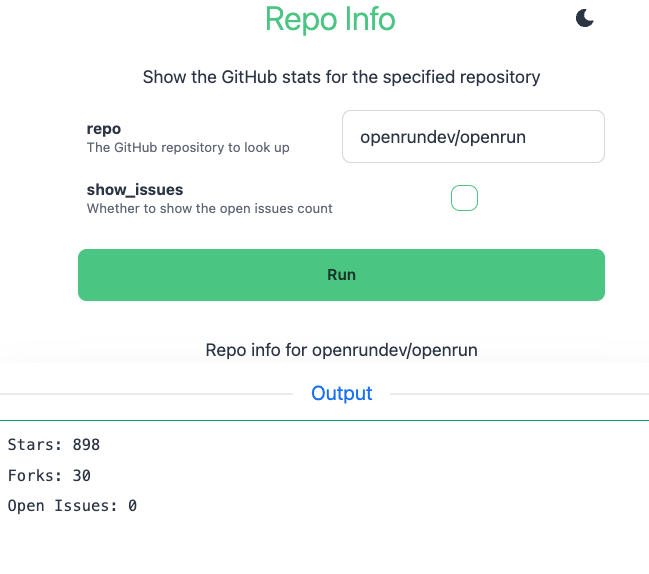
Action Definition
An action is defined using the ace.action struct. The fields in this structure are:
| Property | Optional | Type | Default | Notes |
|---|---|---|---|---|
| name | false | string | The action name | |
| path | false | string | The path to use within app path | |
| run | false | function | The function to run on execution | |
| suggest | true | function | none | The function to run on suggest |
| description | true | string | none | The description for the action |
| hidden | true | list strings | none | The params which should be hidden in the UI for this Action |
| show_validate | true | boolean | False | Whether to show a Validate option for this action |
| permit | true | list string | [] | List of custom RBAC permissions, any one of which need to be granted for the user to allow this action |
The name and description are shown in the app UI. The app params are displayed in a form. BOOLEAN types are checkboxes, others are text boxes.
When the form is submitted, the run function is called. The params are passed as an args argument. The response as returned by the handler is shown on the UI.
args argument to get the values from the form. Referencing param gives the app’s configured parameter values, not the values submitted in the form.The hidden property can be used to hide params for specific Actions. Set it to the list of params to hide, for example hidden=["param1"].
Action Result
The handler returns an ace.result struct. The fields in this structure are:
| Property | Optional | Type | Default | Notes |
|---|---|---|---|---|
| status | true | string | The action status message | |
| values | true | list | [] | The actions output, list of strings or list of dicts |
| report | true | string | ace.AUTO | The type of report to generate. Default is ace.AUTO, where it is selected based on response type. Other options are ace.JSON, ace.TEXT, ace.TABLE, ace.DOWNLOAD and ace.IMAGE. Any other value is a custom template name. |
| param_errors | true | dict | {} | The validation errors to report for each param. The key is the param name, the value is the error message |
Validating Params
The run handler can validate the parameters. If there are errors, it can return a validation error like
def run(dry_run, args):
  if args.dir == "." or args.dir.startswith("./") or args.dir == ".." or args.dir.startswith("../"):
     return ace.result("Validation failed", param_errors={"dir": "relative paths not supported"})
  if dry_run:
     return ace.result("Validation successful")

  # Actual code for run handler
Errors can be reported for multiple params. If the action definition has show_validate=True, then a Validate option will show up in the UI. Calling that will invoke the run handler with dry_run=True. The run handler should return after the param validation when dry_run is true.
Suggest Handler
If a suggest handler is defined for an action, then a Suggest button shows up in the UI. Suggest allows property values to be populated dynamically. For example, if the app has three params A, B and C, and all are empty initially. The first suggest can do return {"A": ["avalue1", "avalue2", "avalue3"]}. This will populate the A param with a dropdown. A subsequent suggest call can populate the value for B, with a list of options or with an actual value. The suggest handler is optional. A sample suggest handler is
def suggest(args):
    if not args.A:
        alist = []
        res = store.select(table.adata, {})
        for aval in res.value:
            alist.append(aval.name)
        return {"A": alist}
    else:
        if not args.B:
            res = store.select_one(table.adata, {"A": args.A})
            return {"B": res.value.bval}
    return {}
See weather app code:demo for an example of using suggest.
Report Types
The response values can be a list of string or a list of dicts. The report is generated automatically by default. For list of strings, the report is a TEXT report. For list of dicts, the report can be either
- TABLE - selected if all dict values for the first row are simple types
- JSON - selected if any of the values for the first row is a complex type (like dict or list)
For TABLE report, the fields from the first row are used as columns. Extra fields in subsequent rows are ignored. For JSON report, a JSON tree representation of each row is shown. The report type can be set to specific type instead of using AUTO.
Streaming Output
A run handler that starts a long running command can stream the command’s output to the page as it is produced, instead of returning it after the command exits. Call exec.run (or container.run) with stream=True, check the call for a startup error, and return the response object in the stream property of ace.result:
load("exec.in", "exec")

def build_run(dry_run, args):
    if not args.target:
        return ace.result("Validation failed", param_errors={"target": "target is required"})
    if dry_run:
        return ace.result("Ready to build " + args.target)

    ret = exec.run("make", [args.target], cwd="/srv/app", stream=True)
    if ret.error:
        return ace.result("Could not start make: " + ret.error)
    return ace.result("Building " + args.target, stream=ret)

app = ace.app("builder",
    actions=[ace.action("Build", "/", build_run, show_validate=True)],
    permissions=[ace.permission("exec.in", "run", ["make"])])
The status text shows immediately and a log pane below it fills as the command prints; terminal colors and progress bar updates render as in a terminal. When the command exits, the pane reports the exit status, and a non-zero exit marks the status line as an error. Closing the page stops the command. Returning the stream response object directly from the handler is shorthand for ace.result("", stream=ret).
A streamed result has no values or report (the output is the report) and cannot carry param_errors: do the validation, and return, before starting the command. A stream returned when dry_run is true (the Validate button) is an error. Nothing is declared on ace.action: the handler decides per run, so a validation failure still returns an ordinary result.
The audit event for the action records success only when the command exits with status 0.
See the actiontail app code for a runnable sample: a shell loop whose output is tailed live, cancelled when the page is left.
Custom Templates
If the report type is set to any value other than ace.AUTO, ace.TEXT, ace.JSON, ace.TABLE, ace.DOWNLOAD or ace.IMAGE, that is treated as a custom template to use. The template should be defined in a *.go.html file. Either the file name can be used or a template/block name can be used. See template for details.
For styling, OpenRun uses DaisyUI by default, so default styles are reset. The custom template can use inline styles or it can use TailwindCSS/DaisyUI. For DaisyUI, the app has to be run in dev mode first for the style.css to be generated. See styling for details.
See dictionary code:demo for an actions example app which shows different type of reports.
Param Value Selector
For some params, it is useful to be able to provide a list of values from which the user can choose. The way this is supported is by using an options param. options_ is a special param name prefix: if param1 is a param which should show up as a selector, then define another param with the name options_param1, of type LIST. Set a default value for options_param1 with the values to show in the selector dropdown. For example
param("param1", description="The param1 description", default="option1")

param("options_param1", type=LIST, description="Options for param1", default=["option1", "option2"])
In the UI, options_param1 is not displayed. param1 is shown as a searchable dropdown, having option1 and option2 as options. Typing in the field filters the options. By default the dropdown is strict: the value has to be one of the options (enforced in the UI and also on the server for configured option lists). To allow free text entry in addition to the listed options, set display_type=COMBO on the param:
param("param1", description="The param1 description", default="option1", display_type=COMBO)

param("options_param1", type=LIST, description="Options for param1", default=["option1", "option2"])
The options-param1 naming format (with a dash) is also supported, for backward compatibility. The underscore format is preferred since it is a valid Starlark identifier, so the value stays accessible in the app code as param.options_param1.
The same applies to dropdowns populated by a suggest handler: values suggested as a list show as a strict searchable dropdown unless the param has display_type=COMBO. See dictionary for an app which uses options.
This approach is used for flexibility, instead of directly allowing the options to be configured for the param. The options param approach has the flexibility that when an app is installed, the options can be configured for the installation. This avoids having to maintain different copies of the app code. For example:
openrun app create --approve --param options_param1='["option1", "option2", "options3"]' /mycode /myappadds a new options3 option.
Display Types
For string type params, the display_type property can be set to FILE, PASSWORD, TEXTAREA or COMBO. If no value is set, the field shows as a text input box. FILE param shows as a file upload input. PASSWORD shows as a password input. TEXTAREA shows as a text area. COMBO makes a dropdown param (one with a value selector or suggest provided options) accept free text entry in addition to the listed options; without it dropdown values are restricted to the list.
File Handling
For FILE display type, the Action app user can upload a file. The file is uploaded to a temp file on the server and the file name is available through the args.param_name. The file can be processed as required from disk. Multiple FILE type params are supported, each param can upload one file only. The temp files are deleted at the end of the handler function execution.
Action request bodies are capped by default at 33554432 bytes. To change this globally, update app_config.action.max_request_body_bytes in openrun.toml. To override it for one app, run:
openrun app update conf --promote 'action.max_request_body_bytes=67108864' /myappTo return a file as output for the action, use the fs.serve_tmp_file API. This makes a file on disk available through an API.
See number_lines app code:demo for an example of using this API. Use report=ace.DOWNLOAD property in the ace.result to generate a file download link.
Files from the system temp directory and from /tmp are accessible by default for serve_tmp_file API. The file is deleted from disk by default after the first download. This can be configured at the system level using
[app_config]
fs.file_access = ["$TEMPDIR", "/tmp"]
To set this at the app level, run
openrun app update conf --promote fs.file_access='["/var/tmp", "$TEMPDIR", "/tmp"]' /myappREST API
Every action app automatically exposes a REST API in addition to the form UI, with no change required in the app code. The API is mounted at the reserved /api path under the app path (an action cannot be defined at the /api path). Authentication and authorization work the same as for the UI: the app level auth applies, and per-action permit RBAC checks are enforced.
| Endpoint | Method | Notes |
|---|---|---|
/app_path/api | GET | List the actions available in the app, with their API paths |
/app_path/api/openapi.json | GET | OpenAPI 3.0 spec for the actions the current user has access to |
/app_path/api/actions/<action> | GET | Get the param definitions (name, type, default, options) |
/app_path/api/actions/<action> | POST | Run the action |
/app_path/api/suggest/<action> | POST | Run the suggest handler |
/app_path/api/validate/<action> | POST | Run the handler with dry_run=True |
<action> is the action path. For an action at path /, the run endpoint is /app_path/api/actions and the validate endpoint is /app_path/api/validate. For an action at path /list, they are /app_path/api/actions/list and /app_path/api/validate/list. The action list endpoint reports the run, validate and suggest paths for each action.
The run/suggest/validate endpoints accept a JSON body with the param values, using native JSON types ({"dir": "/tmp", "detail": true}). String values are coerced to the param type, same as form submissions, and values for params with a selector must be one of the configured options unless the param uses the COMBO display type. Params missing from the body use their app level values, including BOOLEAN params (unlike the form UI, where a missing checkbox means false). Hidden params and unknown params are rejected with a 400 error. Form encoded and multipart bodies are also accepted; params with FILE display type must be submitted as multipart file uploads and cannot be set through JSON.
The response is a JSON object with status, values and report (the resolved report type, such as TEXT, TABLE or JSON). Param validation errors are returned with a 422 status and a param_errors object. Handler failures return a 500 status with an error message.
$ curl -X POST -H "Content-Type: application/json" -d '{"dir": "/var/log"}' https://example.com/myapp/api/actions
{"report":"TEXT","status":"File listing for /var/log","values":["total 0\n..."]}
An action which streams its output responds with chunked text/plain instead: the command output as it is produced (curl -N shows it live), the result status text in the OpenRun-Action-Status response header and the command’s exit status in the OpenRun-Exit-Status HTTP trailer, sent when the stream ends. A missing trailer means the stream was cut before the command exited. Param validation errors and handler failures keep the JSON shapes above.
$ curl -sN -X POST -H "Content-Type: application/json" -d '{"target": "web"}' https://example.com/builder/api/actionsMultiple Actions
Multiple actions can be defined for an app. Each action should have a dedicated path. If there are multiple actions, a switcher dropdown is automatically added for the app. The order of entries in the dropdown is the same order as defined in the app.
See weather app code:demo for an example of using multiple actions in one app.